Chat & Email Role-Play Trainer
Two scored simulators for handling difficult customers. The trainee writes every reply; an AI plays the customer in character, so the wording shifts on every run while the training path and the scoring stay fixed.
💬 Chat simulator
A scored live-chat simulator for handling difficult customers.
What it trains
Synchronous chat handling under time pressure. Two scenarios, both drawn from real e-commerce complaint patterns:
- Sarah Johnson — wrong item received. Ordered one model, received another, wants a replacement and compensation.
- Michael Chen — return rejected. Sent back a damaged item, was refused a refund, and escalates hard. This scenario uses strong language by design.
What it scores
| Greeting speed | A 15-second window to open the chat before the customer disengages |
|---|---|
| Empathy and probing | Acknowledging the emotion, then obtaining the order ID and supporting evidence |
| Hold discipline | Responding before the inactivity clock runs out |
| Escalation call | Escalating only when the customer actually asks, or when the fix sits outside the agent’s authority |
| Closing | Reconfirming the resolution and signing off properly |
The running score and the service-level clocks sit in the right rail, so the trainee sees the cost of a slow greeting while it is still happening rather than only in the debrief.
Under the hood
Node and Express, with the customer’s turn produced by DeepSeek and a chain of fallbacks behind it. If every AI provider is unavailable, the session drops to a guided multiple-choice flow — the wording changes, the scoring does not.
The judgement is made on substance rather than keywords: “could you share the reference number” satisfies the order-ID step just as “what is your order ID” does. The interface is modelled on a Salesforce Lightning service console, so the rehearsal matches the software an agent actually sits in.
✉️ Email simulator
A scored email-handling simulator. One hostile case, a response clock, and a four-part quality breakdown with a model answer.
What it trains
Asynchronous written handling — where the agent gets one shot at a reply and cannot read the customer’s reaction before sending.
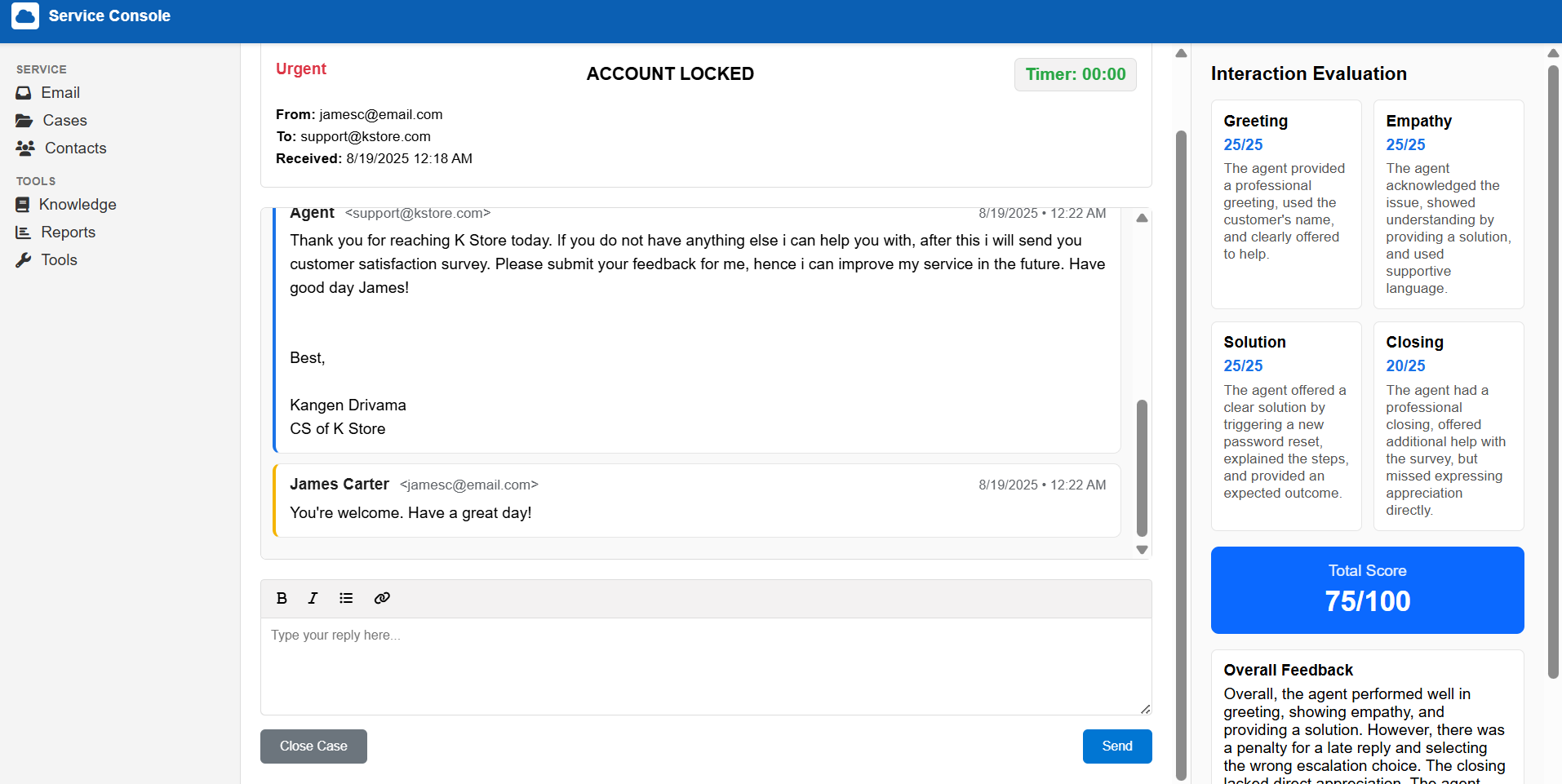
The case: James Carter is locked out of his account. He pressed Forgot Password, the reset email never arrived, and he opens with an accusation rather than a question. The trainee composes a full email reply in the console, against a response clock. Unlike a chat, there is no room to recover a bad opening line halfway through.
What it scores
Four dimensions, 25 points each:
| Greeting | Naming the customer and identifying the brand, promptly |
|---|---|
| Empathy | Acknowledging the lockout and the failed reset before jumping to the fix |
| Solution | Naming the root cause, reissuing access, and stating what happens next |
| Closing | Inviting confirmation that the problem is actually resolved |
On top sit deductions for a slow reply and for an incorrect escalation call, plus a hard fail for conduct that would damage the brand. The escalation step is its own decision: whether the case needs escalating at all, and if so, which queue it routes to.
The debrief
The evaluation panel scores the reply live. “See detailed feedback” opens a per-dimension breakdown — why the score landed where it did, what a full-mark answer would have covered, and a worked example reply to compare against. A score alone tells a trainee they were weak on closing; a model answer shows them what closing well looks like.
K Store is a fictional brand. The customers, orders and evidence are invented for training purposes and are not affiliated with any employer or client.