Training Performance Dashboard
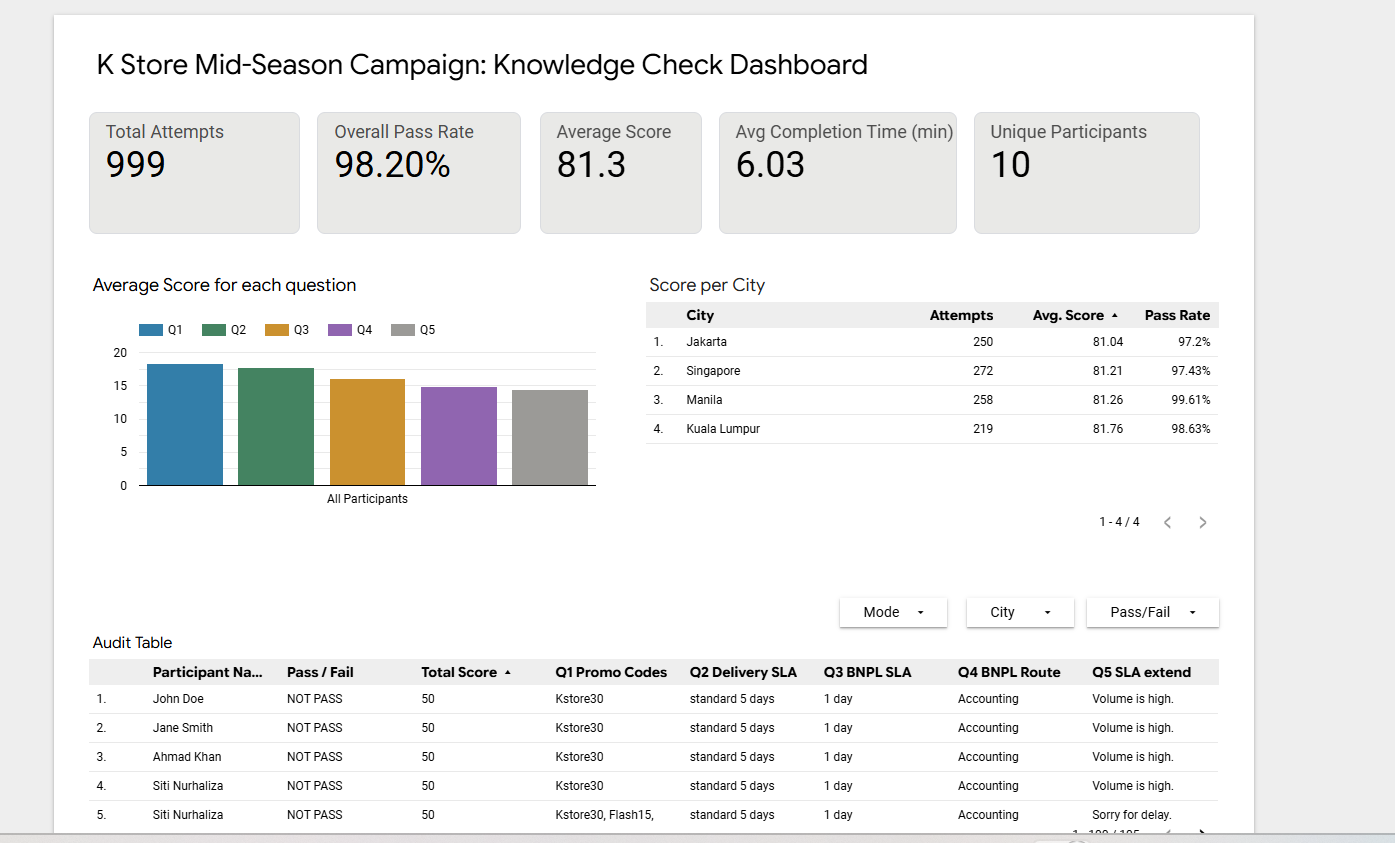
A live training performance dashboard tracking quiz scores, AI assessment results, and completion rates across the full K Store agent training pipeline — built in Google Looker Studio, fed automatically from Google Sheets.
Tools used
- Google Looker Studio — dashboard design and live visualisation
- Google Sheets — central data repository (AI Knowledge Scores Tab and Learner answers)
- Google Apps Script — webhook receiving AI knowledge check and writing to Sheets
- Render.com — AI Tutor app that POSTs scores to the webhook
Creative process
1. Define what to measure
The dashboard was designed around three questions a Training Lead actually needs answered:
- Are agents completing the learning path?
- Are they scoring well on the AI knowledge check?
- Are they answering correctly when the AI assessment pushes them into real customer scenarios?
Everything on the dashboard answers one of these three. Nothing else.
2. Map the data pipeline
Data flows into Google Sheets from two sources:
- AI knowledge check scores — received through a Google Apps Script webhook from the Render-hosted AI Tutor
- Learner answers — stored in the same Google Sheet so the Training Lead can review the actual response patterns, not only the score
Both are kept in the same central repository so the dashboard can pull live performance data without manual file handling.
3. Connect Looker Studio
Looker Studio was connected directly to the Google Sheet as the live data source. No exports, no manual refreshes — new scores and answers appear in the dashboard as soon as they land in the sheet.
4. Design around agent performance
The primary drill-down is by agent. Each row in the performance table shows:
- AI knowledge score
- Answer quality trend
- Overall status (Pass / Review / Retry)
The Training Lead sees the full cohort at a glance and can filter to any individual for coaching.
5. Add trend and score breakdowns
- A completion trend view shows how the cohort is progressing over time
- A score distribution chart helps highlight which knowledge areas are weakest and where intervention is needed
6. Support faster coaching decisions
The dashboard keeps everything in one live view so the learner’s score, answer pattern, and training follow-up remain connected in a single workflow.